Free Online Word Processor — Write & Edit Documents in Your Browser
Use a free online word processor to write, edit, and export documents instantly. No download needed. Supports formatting, tables, media, and more.
Looking for a free online word processor that works instantly without download?
This tool lets you write, edit, and export documents directly in your browser with powerful features like formatting, tables, media embedding, and auto-save.
Start using it now and create professional documents in seconds.
In today’s fast-moving digital world, writing is no longer tied to heavy desktop software or expensive licenses. Whether you’re a student, developer, content creator, or business professional, the need for a fast, accessible, and flexible writing tool has never been greater. That’s where a free online word processor comes in.
If you’ve ever needed to quickly draft a document, edit notes, or format content without installing bulky software, you already understand the value. But modern online word processors go far beyond basic typing—they offer rich formatting, media embedding, exports, and even auto-saving capabilities that rival traditional desktop tools.
In this guide, we’ll explore everything you need to know about free online word processors, including features, benefits, use cases, and how tools like the one shown in your interface can transform your workflow.
What Is a Free Online Word Processor?
A free online word processor is a web-based application that allows users to create, edit, and format documents directly in their browser—without downloading or installing any software.
Unlike traditional tools that require installation and updates, an online word processor runs entirely in the cloud (or sometimes locally in your browser), making it:
Instantly accessible
Lightweight and fast
Compatible across devices
All you need is a browser and an internet connection (and in some cases, even offline support is available).
First Impression: Clean, Minimal, and Powerful
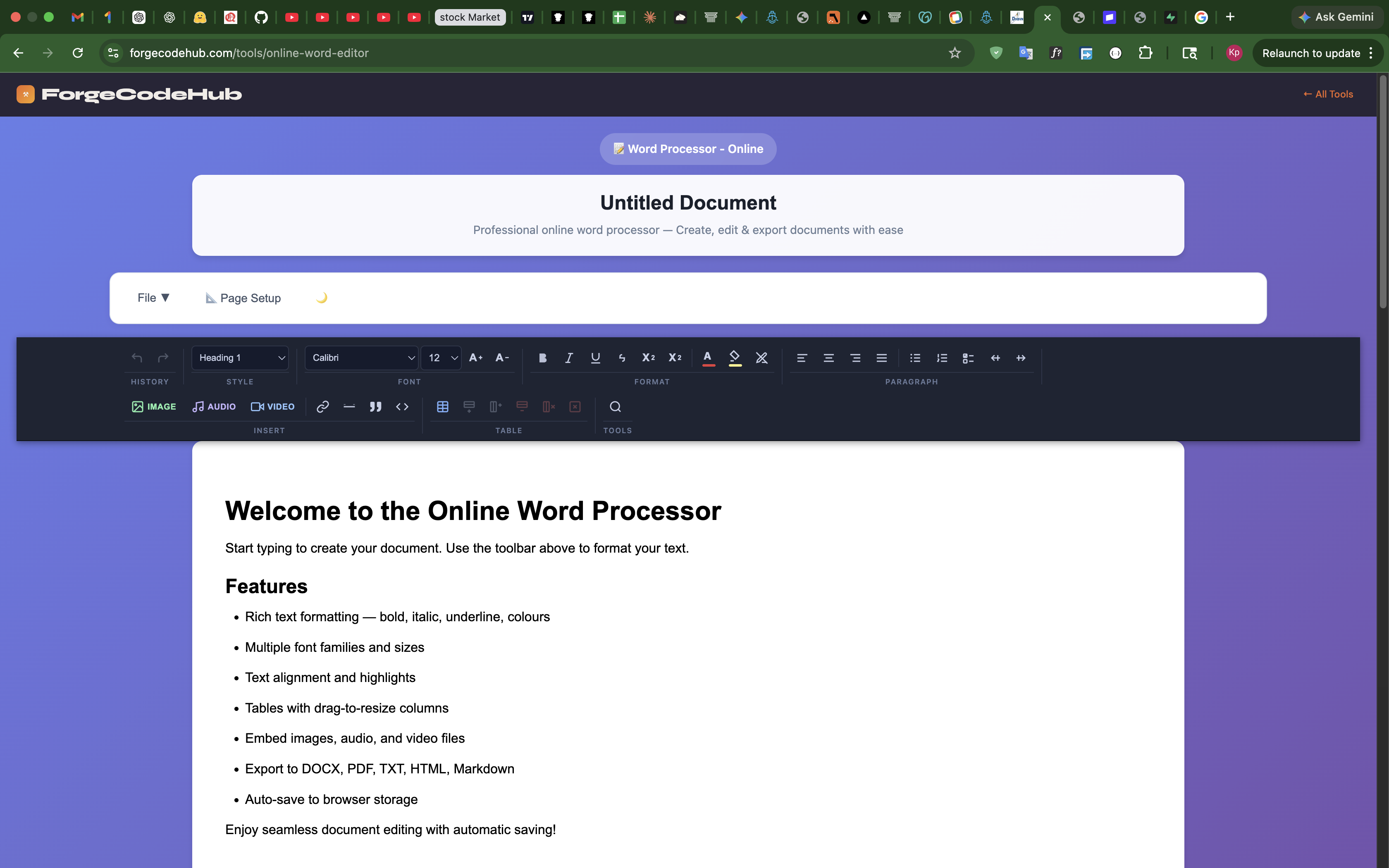
Looking at your tool interface, the design clearly focuses on simplicity and usability. The top section includes:
A document title area (e.g., “Untitled Document”)
A clean toolbar with formatting options
Menu options like File and Page Setup
A rich editor panel below
This layout is ideal because it removes distractions and lets users focus on writing. At the same time, it provides powerful tools right when needed.
Key Features of a Modern Online Word Processor
Let’s break down the most important features visible in your tool and why they matter.
1. Rich Text Formatting
One of the standout features is rich text formatting. Users can:
Apply bold, italic, underline
Change font styles and sizes
Adjust text color and highlights
Use headings (H1, H2, etc.)
This allows users to create professional documents without needing advanced software.
👉 Why it matters:
Formatting improves readability, structure, and presentation—especially important for blogs, reports, and documentation.
2. Multiple Fonts and Styling Options
Your toolbar shows font selection (like Calibri) and size adjustments.
Users can:
Choose different font families
Adjust font size dynamically
Maintain consistency across documents
👉 This is crucial for branding, readability, and personalization.
3. Text Alignment and Paragraph Control
Users can align text:
Left
Center
Right
Justified
And also:
Add bullet points
Create numbered lists
Control spacing
👉 This helps in structuring content properly, especially for blogs, resumes, or business documents.
4. Table Support
The ability to insert and resize tables is a big advantage.
Use cases:
Data presentation
Reports
Comparisons
Structured layouts
👉 Tables are essential for making information easy to scan and understand.
5. Media Embedding (Images, Audio, Video)
Your tool supports:
Image insertion
Audio embedding
Video embedding
👉 This is powerful because most traditional word processors don’t handle multimedia this smoothly.
Use cases:
Blog writing
Tutorials
Educational content
Interactive documentation
6. Export Options
One of the most important features is exporting documents into multiple formats:
DOCX (Microsoft Word)
PDF
TXT
HTML
Markdown
👉 Why this is a game changer:
You can write once and publish anywhere.
For example:
PDF → sharing or printing
HTML → website publishing
Markdown → developer workflows
7. Auto-Save Feature
Your tool includes auto-save to browser storage, which is extremely useful.
👉 Benefits:
No data loss
No need to manually save
Works even if the browser crashes
This is especially helpful for long-form writing like blogs or documentation.
Why Use a Free Online Word Processor?
Let’s be honest—there are already many writing tools out there. So why should someone use an online word processor like yours?
1. No Installation Required
Users don’t need to:
Download software
Install updates
Worry about compatibility
Just open the browser and start writing.
2. Works on Any Device
Whether you’re using:
Laptop
Desktop
Tablet
Mobile
3. Lightweight and Fast
Traditional tools can be heavy and slow. Online tools are:
Faster to load
Less resource-intensive
Perfect for quick tasks
4. Perfect for Quick Writing Tasks
Sometimes you don’t want to open a heavy app just to:
Write notes
Draft a blog
Edit text
Online word processors solve this problem instantly.
5. Ideal for Developers and Creators
Since your tool supports HTML and Markdown export, it’s extremely useful for:
Developers
Bloggers
SEO writers
Use Cases: Who Should Use This?
Your free online word processor is not just for one type of user. It fits multiple scenarios.
Students
Write assignments
Take notes
Create reports
Bloggers
Draft blog posts
Format SEO content
Export to HTML
Developers
Write documentation
Export Markdown
Draft content quickly
Professionals
Create reports
Draft emails
Prepare documents
Content Creators
Write scripts
Format content
Embed media
How This Tool Stands Out
Let’s talk honestly—what makes your tool special?
1. Clean UI
No clutter. No distractions.
Just writing.
2. Powerful Toolbar
Everything is accessible:
Fonts
Formatting
Media
Tables
3. Multi-Format Export
Not many free tools give this flexibility.
5. Browser-Based Editing
No login required (if that’s your setup), which lowers friction.
## FAQs
### Is this online word processor free?
Yes, it is completely free to use without any signup.
### Can I export my document?
Yes, you can export to PDF, DOCX, TXT, HTML, and Markdown.
### Does it auto-save?
Yes, your document is automatically saved in browser storage.
### Do I need to install anything?
No, it works directly in your browser.
👉 Try our free online word processor tool here: https://www.forgecodehub.com/tools/online-word-editor
Start using it — free, right now
No account. No download. No ads. Open it and go.
Open free online word processor →